If you only wish to extract the alpha value for a color, you can simply extract it like so:
<?php
$color = imagecolorat($im, 50, 50);
$alpha = $color >> 24;
?>
It actually shifts off the first 24 bits (where 8x3 are used for each color), and returns the remaining 7 allocated bits (commonly used for alpha)imagecolorallocatealpha
(PHP 4 >= 4.3.2, PHP 5, PHP 7, PHP 8)
imagecolorallocatealpha — Alloue une couleur à une image
Description
imagecolorallocatealpha() se comporte comme
imagecolorallocate() avec en plus le paramètre de
transparence alpha.
Liste de paramètres
imageUn objet GdImage, retournée par une des fonctions de création d'images, comme imagecreatetruecolor().
red-
Valeur du composant rouge.
green-
Valeur du composant vert.
blue-
Valeur du composant bleu.
alpha-
Une valeur entre
0et127.0indique une opacité complète tandis que127indique une transparence complète.
red, green
et blue sont des entiers compris entre 0 et 255, ou
des hexadécimaux compris entre 0x00 et 0xFF.
Valeurs de retour
Un identifiant de couleur ou false si l'allocation échoue.
Avertissement
Cette fonction peut retourner false, mais elle peut aussi retourner une valeur équivalent à false.
Veuillez lire la section sur les booléens pour plus d'informations.
Utilisez l'opérateur ===
pour tester la valeur de retour exacte de cette fonction.
Historique
| Version | Description |
|---|---|
| 8.0.0 |
image attend une instance de GdImage désormais;
auparavant, une resource gd était attendue.
|
Exemples
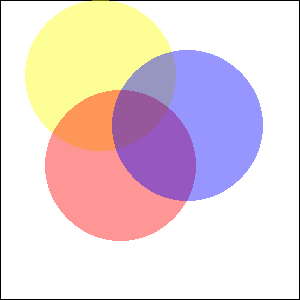
Exemple #1 Exemple d'utilisation de imagecolorallocatealpha()
<?php
$size = 300;
$image=imagecreatetruecolor($size, $size);

// quelque chose pour obtenir un fond blanc avec une bordure noire
$back = imagecolorallocate($image, 255, 255, 255);
$border = imagecolorallocate($image, 0, 0, 0);
imagefilledrectangle($image, 0, 0, $size - 1, $size - 1, $back);
imagerectangle($image, 0, 0, $size - 1, $size - 1, $border);

$yellow_x = 100;
$yellow_y = 75;
$red_x    = 120;
$red_y    = 165;
$blue_x   = 187;
$blue_y   = 125;
$radius   = 150;

// alloue des couleurs avec des valeurs alpha
$yellow = imagecolorallocatealpha($image, 255, 255, 0, 75);
$red    = imagecolorallocatealpha($image, 255, 0, 0, 75);
$blue   = imagecolorallocatealpha($image, 0, 0, 255, 75);

// Dessine 3 ellipses
imagefilledellipse($image, $yellow_x, $yellow_y, $radius, $radius, $yellow);
imagefilledellipse($image, $red_x, $red_y, $radius, $radius, $red);
imagefilledellipse($image, $blue_x, $blue_y, $radius, $radius, $blue);

// Ne pas oublier d'envoyer un header correct
header('Content-Type: image/png');

// et finallement, afficher le résultat
imagepng($image);
imagedestroy($image);
?>
Résultat de l'exemple ci-dessus est similaire à :
Exemple #2 Conversion de valeur alpha typique pour l'utiliser avec imagecolorallocatealpha()
Généralement les valeurs alpha 0 désignent les pixels
complètement transparant, et le canal alpha a 8 bits. Pour convertir de
telle valeurs alpha pour être compatible avec
imagecolorallocatealpha(), un peu d'arithmetique simple
est suffisante :
<?php
$alpha8 = 0; // fully transparent
var_dump(127 - ($alpha8 >> 1));
$alpha8 = 255; // fully opaque
var_dump(127 - ($alpha8 >> 1));
?>
L'exemple ci-dessus va afficher :
int(127)
int(0)
Voir aussi
- imagecolorallocate() - Alloue une couleur pour une image
- imagecolordeallocate() - Supprime une couleur d'une image
+add a note
User Contributed Notes 3 notes
eric (at) junioronline.us 
18 years ago
Brett G 
8 years ago
When working with transparency, avoid imagecreate() and use imagecreatetruecolor() instead. Transparency effects may not work as expected within a palette-based image.
fjoggen at gmail dot com 
16 years ago
If you need to calculate the integer representation of a color with an alpha channel, without initialising an image and using the imagecolorallocatealpha function. Then this function might be of some help:

<?php
function alphaColor($hexColor,$alpha)
{
        return bindec(decbin($alpha).decbin(hexdec($hexColor));
}

echo alphaColor("FFFFFF",127);
?>